Ancient Retro Text Effect 3D: Elevate Your Design Projects with Timeless Typography
Typography is one of the most powerful tools in a designer’s arsenal. It can transform an ordinary design into something extraordinary, especially when it captures a specific mood or era. The Ancient Retro Text Effect 3D is a creative resource that brings a nostalgic, vintage aesthetic to your Adobe Photoshop projects. This text effect isn’t just another font—it's a fully editable design template that allows you to customize every detail while maintaining the essence of retro visual appeal.
What Is Ancient Retro Text Effect 3D?
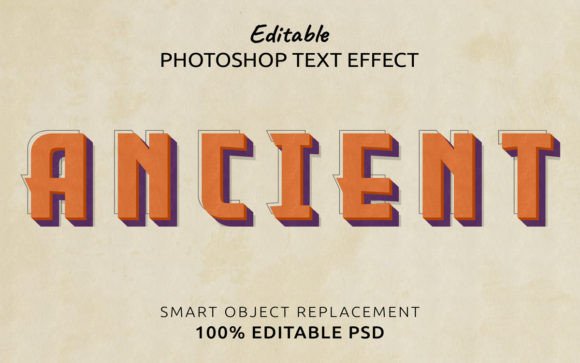
The Ancient Retro Text Effect 3D is a layered Photoshop file (.PSD) designed to help users apply a classic, weathered look to their text with ease. Unlike static fonts, this effect gives you full control over colors, textures, lighting, and depth, all while preserving the authentic retro feel. Inside the downloadable zip file, you'll find one editable PSD file and a preview JPG for reference. It's ideal for designers who want to infuse warmth, character, and historical charm into their work without starting from scratch.
Common Challenges in Creating Retro Text Effects
Designing a convincing retro text effect manually can be time-consuming and technically demanding. Many challenges arise, including:
- Lack of authenticity: Achieving the right level of decay, oxidation, or age in text requires attention to detail that can be difficult for beginners.
- Time constraints: Building custom effects layer by layer may not be feasible for fast-paced project timelines.
- Software limitations: Some text effects are only compatible with certain programs, limiting flexibility and creativity.
- Scalability issues: Ensuring that the effect remains crisp and visually appealing at different sizes is often tricky.
These hurdles can prevent even experienced designers from experimenting freely or delivering high-quality results efficiently. That’s where the Ancient Retro Text Effect 3D comes in handy.
How Ancient Retro Text Effect 3D Addresses These Needs
This text effect is specifically crafted to streamline the process of creating vintage-style typography. Since it's a Photoshop CC file, it supports non-destructive editing, meaning you can tweak every element—color, contrast, texture, and more—without compromising the original quality. The 100% editable nature of the effect ensures that you're not limited by pre-defined styles; instead, you can adapt it to fit any theme or color scheme you have in mind.
One of the standout features of this tool is its compatibility. While it cannot be opened outside of Adobe Photoshop, it works seamlessly within the software environment, giving you the freedom to integrate it into various types of projects—from branding materials to digital illustrations and promotional graphics.
Practical Applications and Use Cases
The Ancient Retro Text Effect 3D is incredibly versatile and can be applied across multiple industries and design disciplines. Here are some practical examples:
- Branding and Packaging: Add a sense of history and craftsmanship to logos, labels, and packaging designs for artisanal products or heritage brands.
- Web and App UI: Use the effect sparingly in headers or buttons to evoke nostalgia while maintaining modern usability.
- Print Media: Enhance posters, flyers, and brochures for events like music festivals, antique fairs, or historical reenactments.
- Digital Art and Illustrations: Incorporate the effect into backgrounds or titles to create a cohesive, themed visual narrative.
- Social Media Content: Create eye-catching captions or headings for posts that require a vintage flair to stand out.
For instance, if you're working on a campaign for a new line of craft beer inspired by ancient brewing traditions, using the Ancient Retro Text Effect 3D could help reinforce the brand’s story and visual identity effectively.
Getting Started with Ancient Retro Text Effect 3D
To use the Ancient Retro Text Effect 3D, simply download the zip file and extract its contents. Open the provided .PSD file in Adobe Photoshop CC or later. You’ll see a clearly organized layer structure, making it easy to edit each component individually. Change the font type, adjust colors, add shadows, or modify textures—all without losing the integrity of the original design.
Since the font used in the preview is for demonstration purposes only, it's recommended to replace it with your preferred typeface. However, the effect itself will remain intact, allowing your chosen text to take on the same aged, three-dimensional appearance. The scalability feature also means you can resize the text as needed, whether you're designing for a billboard or a mobile app screen.
Customization Tips for Maximum Impact
While the Ancient Retro Text Effect 3D provides a solid foundation, the way you customize it can greatly influence the final outcome. Here are a few tips to consider:
- Experiment with color variations: Try warm earth tones or muted pastels to match different moods or themes.
- Layer blending modes: Adjust the blending settings of individual layers to enhance the weathered look or create subtle highlights.
- Combine with other textures: Overlay parchment paper, wood grain, or stone surfaces to amplify the vintage atmosphere.
- Use smart objects: To maintain sharpness and clarity when scaling up or down, ensure your text is converted into a smart object before applying the effect.
Remember, the goal is to make the effect feel natural and integrated with the rest of your design. Avoid overdoing it, especially in minimalist layouts where too much texture might clash with the overall style.
Different Approaches Based on User Goals
Depending on your experience level and project requirements, you might approach the Ancient Retro Text Effect 3D differently:
- Beginners: Use the effect as-is for quick, impactful designs. Focus on changing the text and adjusting basic color tones to suit your needs.
- Intermediate Users: Dive deeper into layer adjustments, explore gradient maps, and combine the effect with other Photoshop brushes or overlays for a more personalized touch.
- Advanced Designers: Modify the entire structure of the effect to create unique variations or blend it with 3D modeling techniques for a more dynamic result.
Each approach allows you to harness the potential of the Ancient Retro Text Effect 3D while aligning it with your creative vision and workflow efficiency.
Why Choose This Over Traditional Fonts?
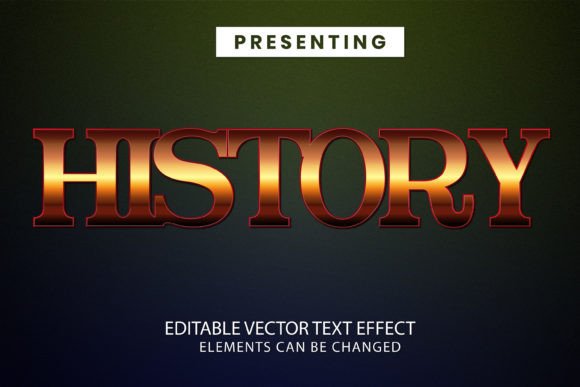
Although many retro-inspired fonts exist, they often lack the depth and dimensionality that makes the Ancient Retro Text Effect 3D so compelling. This effect goes beyond flat typography by incorporating realistic 3D elements such as bevels, lighting, and material textures. As a result, your text doesn’t just look old—it feels tangible and alive on the page.
Moreover, because it's an effect rather than a font, you're not restricted to the characters available in a particular typeface. This is particularly useful when you need to include symbols, special characters, or languages not supported by the default font.
Considerations Before Using the Effect
Before integrating the Ancient Retro Text Effect 3D into your project, keep the following points in mind:
- Ensure you have Adobe Photoshop installed. This is essential for opening and editing the .PSD file.
- Review the preview JPG to understand how the effect appears in its default state. This can help set expectations and guide your customization choices.
- Test the effect at different sizes to confirm it scales well and maintains visual appeal across various outputs (print vs. digital).
- Keep the design context in check—retro effects may not always be appropriate for modern or sleek aesthetics.
By considering these factors upfront, you can avoid common pitfalls and ensure the effect enhances rather than distracts from your overall design.
Real-World Outcomes and Creative Possibilities
Once implemented, the Ancient Retro Text Effect 3D can significantly elevate the visual storytelling of your project. Think about the impact it could have on a book cover for a fantasy novel set in an ancient civilization, or a promotional poster for a live theater production with a historical setting. In both cases, the effect adds a layer of authenticity and intrigue that grabs attention and sets the tone.
It’s also excellent for adding a decorative yet readable headline to magazine covers, blog posts, or event banners. The 3D aspect introduces depth that can make your text pop, especially when paired with contrasting background colors or gradients.
Final Thoughts
In today’s design landscape, standing out requires more than just good visuals—it demands intentionality and uniqueness. The Ancient Retro Text Effect 3D offers a reliable and flexible solution for those looking to incorporate vintage charm into their work. Whether you’re an amateur designer or a seasoned professional, this tool empowers you to experiment quickly and deliver stunning, high-impact results.
With its user-friendly structure, full editability, and rich visual qualities, the Ancient Retro Text Effect 3D is more than just an aesthetic enhancement. It's a valuable asset that can help you communicate your message more effectively and leave a lasting impression on your audience. So go ahead, open the file in Photoshop, and let your creativity reshape the past for your next project.