Bronze Text Style Effect: Add a Touch of Elegance to Your Adobe Illustrator Projects
When it comes to making your designs stand out, the right text effects can be a game-changer. The Bronze Text Style Effect is one such resource that brings a unique and professional flair to any project in Adobe Illustrator. This isn’t just another font—it’s a full-fledged 3D-style text effect that adds depth, texture, and visual interest with minimal effort.
What Exactly Is the Bronze Text Style Effect?
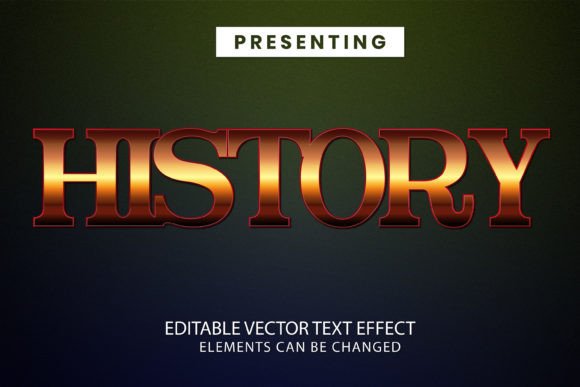
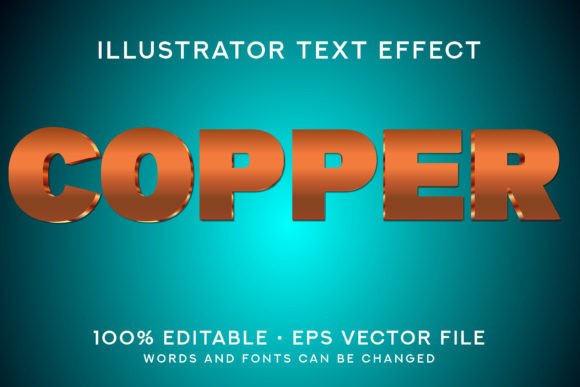
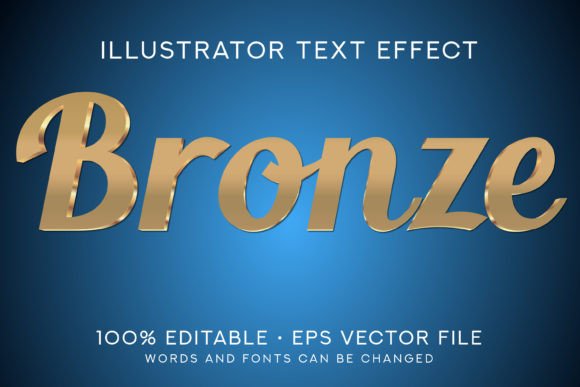
The Bronze Text Style Effect is an Adobe Illustrator CS6 file format design effect. It allows you to apply a rich, metallic bronze look to your text without having to manually create every detail from scratch. Once you open the file, you can easily edit the text to suit your needs—whether you’re designing for print, digital media, or personal use.
This effect is fully scalable and editable, meaning you can adjust everything from size to color tone. Inside the ZIP file you download, you’ll find an EPS10 format file for compatibility across different projects, a preview JPG so you can see what to expect, and clear instructions on how to use the effect effectively.
Real-World Applications: Where Can You Use This Effect?
Whether you're a graphic designer, marketer, blogger, or small business owner, this effect can enhance your work in countless ways. Here are some practical scenarios where the Bronze Text Style Effect can make a real difference:
- Marketing Materials: Use it on posters, flyers, or brochures to add a premium feel. A bronze-effect headline can draw attention and elevate the perceived value of your message.
- Logo Design: Incorporate the effect into logos for businesses in industries like luxury goods, automotive, or finance, where a metallic sheen suggests sophistication and quality.
- Web and App UI Elements: If you're working on interface elements like buttons or banners, the bronze effect can give them a classic yet modern appearance, especially when paired with minimalist layouts.
- Invitations and Event Designs: Whether it's a wedding invitation or a corporate event poster, the warm tones of bronze text can convey elegance and exclusivity.
- Product Packaging: Stand out on store shelves by using this effect on labels or branding tags. It works especially well for items like candles, cosmetics, or gourmet products.
- Blog Headers and Social Media Posts: If you're looking to create eye-catching headers for your blog or social media content, bronze text can offer a bold contrast against darker backgrounds.
Why Choose Bronze Over Other Effects?
Not all text effects are created equal, and the choice of effect should depend on the message you want to send. Bronze has a timeless appeal that blends tradition with modern aesthetics. Unlike flashy neon or grungy textures, bronze feels grounded and luxurious—perfect for high-end brands or refined artistic expressions.
For instance, imagine you're creating a promotional banner for a new line of handmade watches. Using the Bronze Text Style Effect can help you highlight the craftsmanship and durability of the product through its visual language. Similarly, if you're a freelancer showcasing your portfolio, adding this effect to your name or tagline can instantly make your design more polished and professional-looking.
How Different Users Benefit from This Effect
Graphic designers might use the Bronze Text Style Effect to quickly mock up client proposals or refine their own branding materials. Marketers could integrate it into presentations or landing pages to create a sense of prestige around a product launch. Bloggers and educators may find it useful for title cards in online courses or tutorials, helping to structure content visually without overcomplicating the layout.
Entrepreneurs launching a new product often need to make a strong first impression. This effect can help them craft packaging or promotional images that speak volumes before a single word is read. Even hobbyists who dabble in design for personal projects like scrapbooking or custom greeting cards can benefit from its easy-to-edit nature and professional finish.
Getting Started with Bronze Text Style Effect
If you’ve never used a pre-made text effect in Adobe Illustrator before, don’t worry. The process is straightforward. Simply unzip the downloaded package and open the CS6 file. From there, select the text layer and replace the default words with your own. Adjust the size, orientation, or even the lighting angle to match the background or theme of your project.
Because this is not a font but a complete design effect, it ensures that the visual style remains intact no matter what you type. You won’t have to worry about inconsistent rendering or formatting issues that sometimes come with custom fonts.
Things to Keep in Mind Before Applying the Effect
Before you start using the Bronze Text Style Effect, consider the following points to ensure it fits seamlessly into your project:
- Software Compatibility: This effect is specifically designed for Adobe Illustrator CS6. While it may work in newer versions, always test it in your preferred version to avoid unexpected issues.
- Background Contrast: Bronze text tends to shine best on dark or neutral backgrounds. If you’re using it on a light or busy backdrop, you might need to tweak the shadows or outlines to maintain visibility.
- Color Matching: Although the default is bronze, you can adjust the colors slightly to better fit your brand palette or theme. Just make sure the changes still retain the metallic essence of the original design.
- Readability: As with any stylized text, keep legibility in mind. Avoid using too many characters or overly complex phrases that might become difficult to read once the effect is applied.
Practical Examples of How This Effect Elevates Projects
Let’s say you're preparing a birthday card for a friend who loves vintage aesthetics. By applying the Bronze Text Style Effect to the main title, you can instantly give the card a retro, handcrafted look that stands apart from standard printed greetings.
Another example: you're designing a website for a boutique coffee shop. The homepage features a hero image of a steaming cup of coffee. To complement the warm, earthy tones, you choose the Bronze Text Style Effect for the heading “Brewed with Care.” The result? A cohesive and inviting visual that aligns with the brand’s identity.
Or perhaps you're putting together a presentation for a potential investor. Instead of using plain black text for your company name, the bronze effect adds a subtle level of professionalism and creativity that can set your pitch apart from the competition.
Who Should Consider Adding This to Their Toolkit?
Anyone who regularly works with Adobe Illustrator and wants to save time while achieving a premium look will find this effect valuable. Here’s a quick breakdown of who might benefit most:
- Freelancers: Save hours of manual work by using this ready-made effect instead of building a similar one from scratch.
- Business Owners: Enhance your marketing collateral, product labels, or signage with a consistent and attractive text style.
- Design Students: Learn how professional text effects are structured and used in real-world applications.
- Content Creators: Make your YouTube thumbnails, Instagram stories, or Pinterest pins more engaging with standout typography.
Final Thoughts on Practicality and Impact
At the end of the day, the goal of any design element is to communicate clearly and effectively. The Bronze Text Style Effect helps achieve that by combining visual appeal with functionality. It’s not just about looking good—it’s about making your message resonate better with your audience.
By choosing this effect, you’re investing in a tool that streamlines your workflow and enhances your output. And because it’s entirely customizable within Adobe Illustrator, you can adapt it to fit almost any project, whether you're aiming for a rustic charm or a sleek, modern vibe.
So, next time you're working on a design that needs just a little extra oomph, remember that something as simple as a bronze text effect can make all the difference. Open the file, edit the text, and watch your ideas take on a whole new dimension.